
Skip to content
Tourvia Tourvia
Tourvia, formerly RouteForce

Plan and run every field visit from Salesforce.

Turn Salesforce records into optimized routes, scheduled Events, and completed visit reports. Reps plan and work from one managed package inside Salesforce.

5.0 ★ AppExchange reviews · verified 16 July 2026 TourviaApp 7.33.0 · Salesforce security review passed Customer pilots underway €30/user/month · billed annually
Salesforce Lightning · Tourvia route workspace Tourvia routing engine

Filters, live map, route plan, and visit creation in one Salesforce workspace. Click the screen to expand.

Brand
Tourvia, formerly RouteForce
Engine
Tourvia routing engine
Hosting
OVHcloud · Gravelines, FR
CRM data
Stays in your org
Package
Managed · V7 security review
Pricing
€30 / user / month · annual
Waypoint 01The field day

One field day. Five stations. Zero exports.

Follow a field day from territory selection to manager reporting, all within Salesforce.

Tourvia ops · a rep’s field day Tourvia in Salesforce

Open the map. The whole territory reports in.

Every geocoded record appears on one live map, filtered by any Salesforce field, clustered by density and colored by status. Saved presets put the same view in front of the whole team.

  • Multi-object map, clustering, heatmap
  • Filters on any field, saved and shared
  • Center on rep, record, or radius
01 / 05 Swipe or use arrows
Waypoint 02Capabilities

Three jobs. One managed package.

Everything below ships in the package. There are no add-ons, per-feature prices or external apps to connect.

See

See the territory

The CRM becomes a map your team can actually read.

  • Accounts, Leads, Opportunities & Campaign Members on one map
  • Filter by any Salesforce field with saved, shareable presets
  • Clustering, heatmap, and status-based marker colors
  • Record popups with context and one-click actions
Move

Move the day

From a cloud of pins to a realistic, booked field day.

  • Lasso-select an area and add every stop in one gesture
  • Tourvia routing engine sequencing with time windows, lunch break, toll & highway rules
  • One click → timed Salesforce Events, conflict-checked
  • Google Maps hand-off and CSV export
  • Route history to replay and compare past days
Prove

Prove the work

Field activity becomes data managers can stand behind.

  • GPS check-in, verified within a 500 m radius
  • Configurable visit reports for results, satisfaction, order amount and notes
  • Quick Text templates for fast field notes
  • 2 dashboards & 18 reports from day one
One component for every Salesforce surface
Account, Lead & Opportunity pages Campaign record pages Lightning App Pages Home pages & tabs Experience Cloud Configured via Custom Metadata
How the native integration works
Waypoint 03Product tour

See Tourvia in action.

Explore mapping, route optimization, scheduling, GPS check-in, and reporting inside Salesforce.

Salesforce Mobile

Run the field day from Salesforce Mobile.

Tourvia runs in the Salesforce Mobile App your reps already carry. Today’s agenda, the live map, nearby records and field actions stay one tap away between visits.

  • Native Salesforce Mobile experience with no separate app
  • GPS check-in and visit reports from the field
  • One-tap navigation hand-off to Google Maps
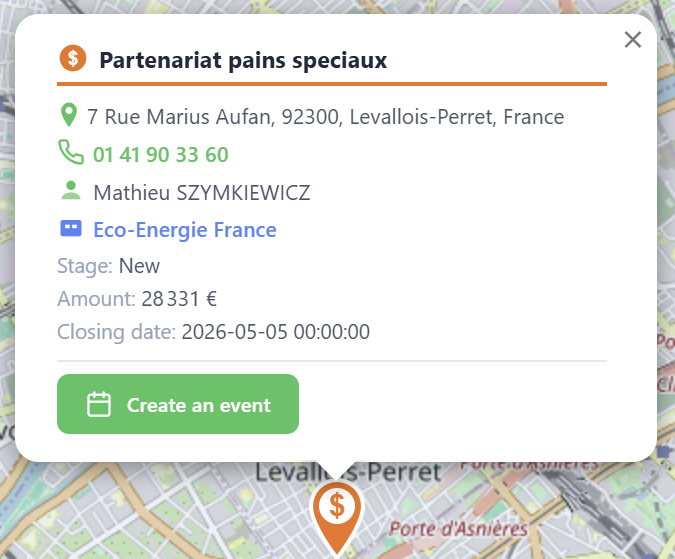
Tourvia marker popup showing an opportunity with address, contact, stage, amount, and a create-an-event action
Campaign operations

Point any campaign at the map.

Pick a campaign and its members appear as routable stops from the Campaign record page or the global map. Lead and Contact members are geolocated from their parent records, colored by member status and ready to be routed like any other stop.

  • Campaign picker on the global map, or embedded per campaign
  • Status-based colors show who’s been reached
  • Marker popup to record, event, or call in one click
Route history

Every route stays on the record.

Optimized days don’t evaporate at midnight. Each route is saved with its stops, distance and drive time. Reload it, run it again or compare how the territory was covered over time.

  • Saved routes with steps, km, and duration
  • Replay any past day on the map
  • Coverage feeds the included reports
Waypoint 04Architecture

Salesforce keeps the records. Tourvia calculates the route.

Accounts, Events, visits, and reports stay in Salesforce. Tourvia processes only the coordinates and timing constraints required to calculate a route.

Your Salesforce org
  • TourviaApp 7.33.0 on the Security-Review-approved package lineage
  • Lightning Web Component map on any page
  • Native scheduling with Salesforce Events and calendar
  • Visit reports stored on your records
  • Standard Reports & Dashboards
Salesforce remains the system of record.
Tourvia routing core
  • Constraint-aware route optimization
  • Hosted on OVHcloud in Gravelines, France
  • EU route processing aligned with GDPR requirements
  • No routing API pass-through fees
  • Self-hosted engines with no third-party map quota
Uses only what routing needs.

Salesforce remains the main CRM data system; the routing core uses the data required for route calculations. Full details in the privacy policy

Distribution Private AppExchange listing

Clients can open the private listing from this site. Install access remains controlled for the target org. View listing

Admin No-code configuration

Objects, fields, actions and check-in forms are controlled through Custom Metadata. No Apex is required.

Access control 3 access groups

Permission Set Groups for Admin, Manager, and User ship with the package.

Validation Trial in your own org

Run a 30-day trial in your Salesforce org with your data, territory, and users.

Waypoint 05Pricing

One price for the complete product: €30.

Per licensed user, per month, billed annually. Pricing ROI for field teams.

30-day trial on request

Validate Tourvia with your Salesforce team before rollout

30days · in your org
  • Trial requested via contact form
  • Salesforce org qualification
  • Route planning workflow validation
  • Private package install access
  • Subscription confirmed before production rollout
Request a 30-day trial

Tourvia

Complete product

For licensed Salesforce users

€30/user/month
excl. tax · billed annually
  • Complete feature set
  • Route optimization engine
  • GPS check-in & visit reports
  • Route history & replay
  • Dashboards & 18 reports
  • Standard pricing per licensed user
  • Email support
See pricing details

Annual billing. Standard pricing applies per licensed user. Installation and configuration are customer-managed.
Calculate the annual subscription at €360 excluding tax per licensed user. Full pricing details.

Pre-flight questions

Frequently asked questions

What is Tourvia?
Tourvia is Salesforce route planning software that keeps route optimization, visit planning and field execution inside Salesforce. It is the new product name for RouteForce, with the same managed package and workflow.
Who is Tourvia best for?
Salesforce-first field teams that want route planning and visit execution tied directly to CRM records, Events and reporting instead of exporting to a separate routing app and syncing back.
Is Tourvia on the AppExchange?
Tourvia V7 has passed the Salesforce security review and is distributed through a private AppExchange listing. The listing is linked from this site so clients can open it; installation remains controlled by private access for the target org.
How much does Tourvia cost?
Tourvia costs €30 excluding tax per licensed user per month, billed annually. See full pricing details.
Where is my data processed?
Salesforce remains the system of record for accounts, Events, visits, and reports. Route calculations use only the coordinates and timing constraints required for the route. These requests are processed by Tourvia infrastructure hosted in France.
Does it work on mobile?
Yes. Tourvia runs in the Salesforce Mobile App: map, today’s agenda, navigation hand-off to Google Maps, GPS check-in, and visit reports all work from the field.
How do I start a trial?
Request a 30-day trial via the contact form. We qualify your Salesforce org and share private package access. Your admin installs and configures Tourvia using the documentation.
Final waypointStart

Bring every field visit into Salesforce.

Request access, install the package, and configure Tourvia using the documentation.

  1. 01
    Org qualification

    We confirm Tourvia fits your Salesforce setup and your field workflow.

  2. 02
    Private install access

    You receive the private AppExchange install link for your org.

  3. 03
    30-day validation

    Your admin installs and configures the package; your team tests routes using your Salesforce records.

  4. 04
    Subscription confirmed

    You confirm the €30/user/month scope before any production rollout.

Prefer email? contact@routeforce.app

Get in touch

Request private package access for a 30-day trial.

By submitting, you agree to our Privacy Policy.