 Tourvia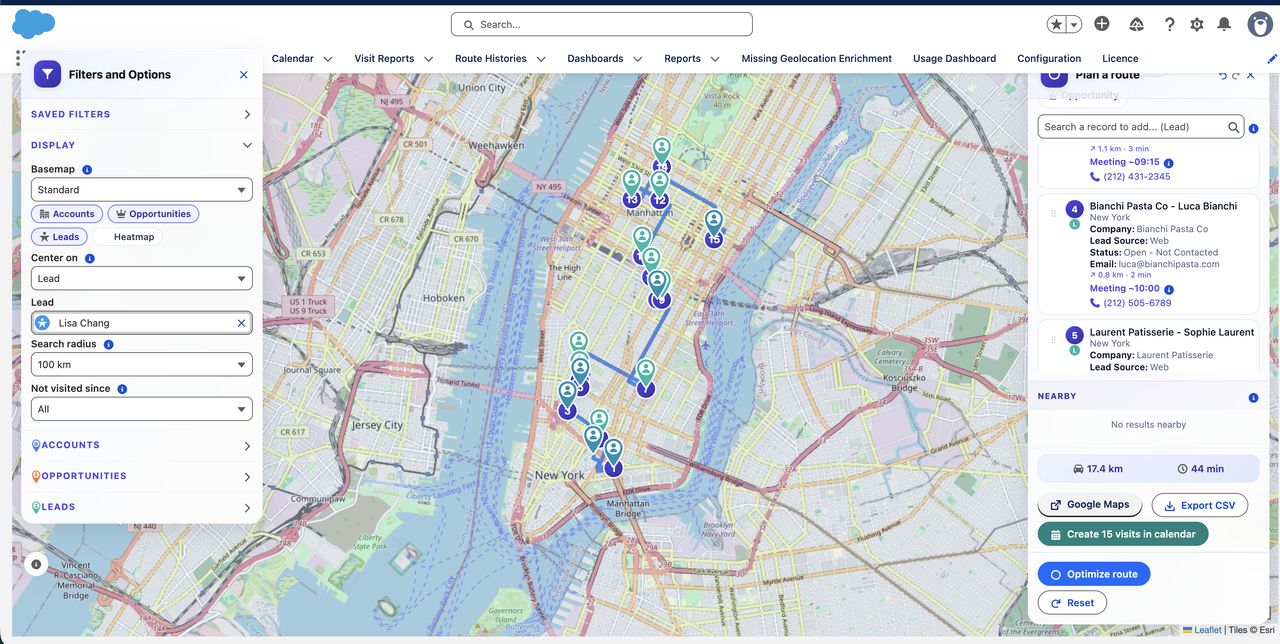
One workflow from account selection to visit reporting
Reps select Salesforce records, optimize the day, create timed Events, and complete each visit from Salesforce Mobile. Managers use standard Salesforce reports and dashboards to review the result.
1. Select
Filter Accounts, Leads, Opportunities, Contacts, or Campaign Members and add the right stops.
2. Optimize
Build a route around travel mode, visit duration, time windows, breaks, and working hours.
3. Schedule
Create timed Salesforce Events on the corresponding records after conflicts are checked.
4. Execute
Check in, complete the visit report, check out, and move to the next stop from Salesforce Mobile.
Why keep route planning inside Salesforce?
Standalone route planners can calculate a route, but they introduce another login and a separate data model. Tourvia keeps the operational record in Salesforce.
- Current CRM context: plan from owners, priorities, Campaign status, previous visits, and any other Salesforce field.
- No duplicate visit entry: planned visits become Salesforce Events on the correct records.
- Native access control: the package includes Permission Set Groups for users, managers, and admins.
- Native reporting: visits, route history, check-ins, and reports remain available to Salesforce analytics.
What Tourvia accounts for when building a route
A field day is more than the shortest line between pins. Tourvia can include:
- start and end locations;
- working hours and lunch breaks;
- customer availability windows;
- visit duration at each stop;
- travel mode and route preferences;
- existing Salesforce Event conflicts.
The rep can review the result before any Event is created.
Salesforce remains the system of record
Accounts, Events, visits, route history, and reports are stored in Salesforce. Route calculations use only the coordinates and timing constraints required to calculate the route. Those requests are processed by Tourvia infrastructure hosted in France.
Read the Privacy Policy or review the DPA.
Built for Salesforce-led field teams
Built for
Field sales, account management, merchandising, inspections, or recurring customer visits managed from Salesforce.
Use a field service platform instead
Tourvia is not designed for emergency dispatch, technician skills matching, parts inventory, or service appointment orchestration.
Compare Tourvia with other route planning tools
Compare the Salesforce workflow, route constraints, mobile execution, data processing, and annual cost at your actual user count.
Compare Salesforce Maps alternatives
Review Salesforce Maps pricing
Install and validate Tourvia in four steps
- Request a trial. Private AppExchange access is coordinated after the request.
- Install the managed package. Your Salesforce admin follows the published setup guide.
- Assign access. Use the supplied Admin, Manager, and User Permission Set Groups.
- Run real routes. The complete product is available during the 30-day trial.
€30 per licensed user per month
Tourvia costs €30 per licensed user per month excluding tax, billed annually. The subscription includes the complete product and routing calculations with no routing API pass-through fee.
Multiply the number of licences by €360 to calculate the annual subscription.
See full pricingFrequently asked questions
Standard Salesforce does not include an optimized multi-stop field route planner. Tourvia adds this workflow as a managed package.
Yes. Reps can use Today's Agenda, check-in, check-out, visit reports, nearby records, and navigation handoff from Salesforce Mobile.
Tourvia supports Accounts, Contacts, Leads, Opportunities, Campaign Members, and configured custom workflows.
Yes. The requested 30-day trial includes the complete Tourvia feature set.
Plan your next field day inside Salesforce
Request a complete 30-day trial and validate the route-to-visit workflow with your own Salesforce records.